

Now on Apple TV, Android TV and Fire TV

A player for the media you already have.

Give Vizi your playlist — an M3U link or an Xtream Codes login — and it plays what is there, with a layout built for a phone rather than shrunk onto one. Vizi+ adds downloads, and a full TV guide where your playlist provides one.

Shown with Vizi's built-in demo library. Every title in it is invented.

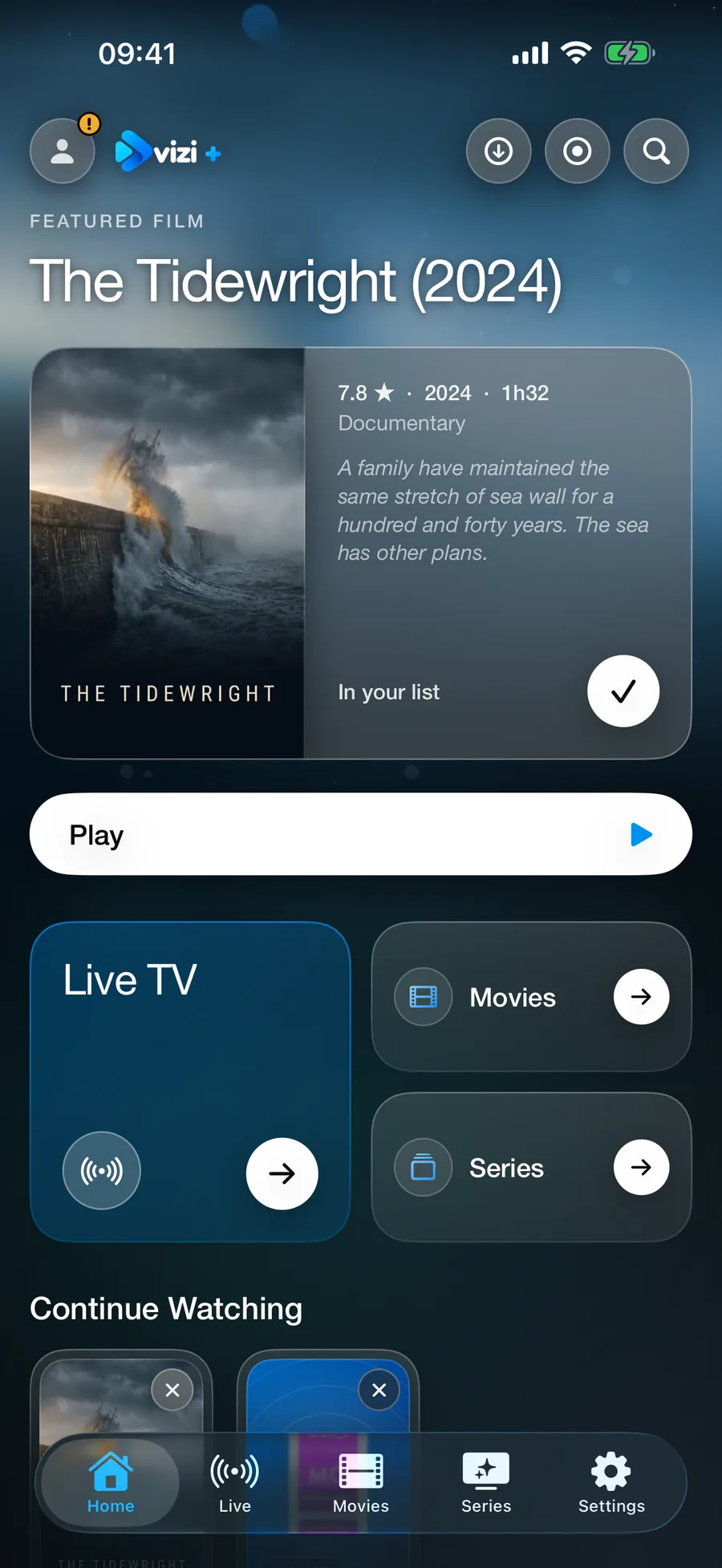
The Vizi home screen in its new design: a featured film with its synopsis and a Play button, cards for Live TV, Movies and Series, then Continue Watching
Home

Pick up where you left off.

Stop part-way through a film or an episode and it picks up from that second. With Vizi+, what you started waits on the first screen, part-watched and ready.

Live TV

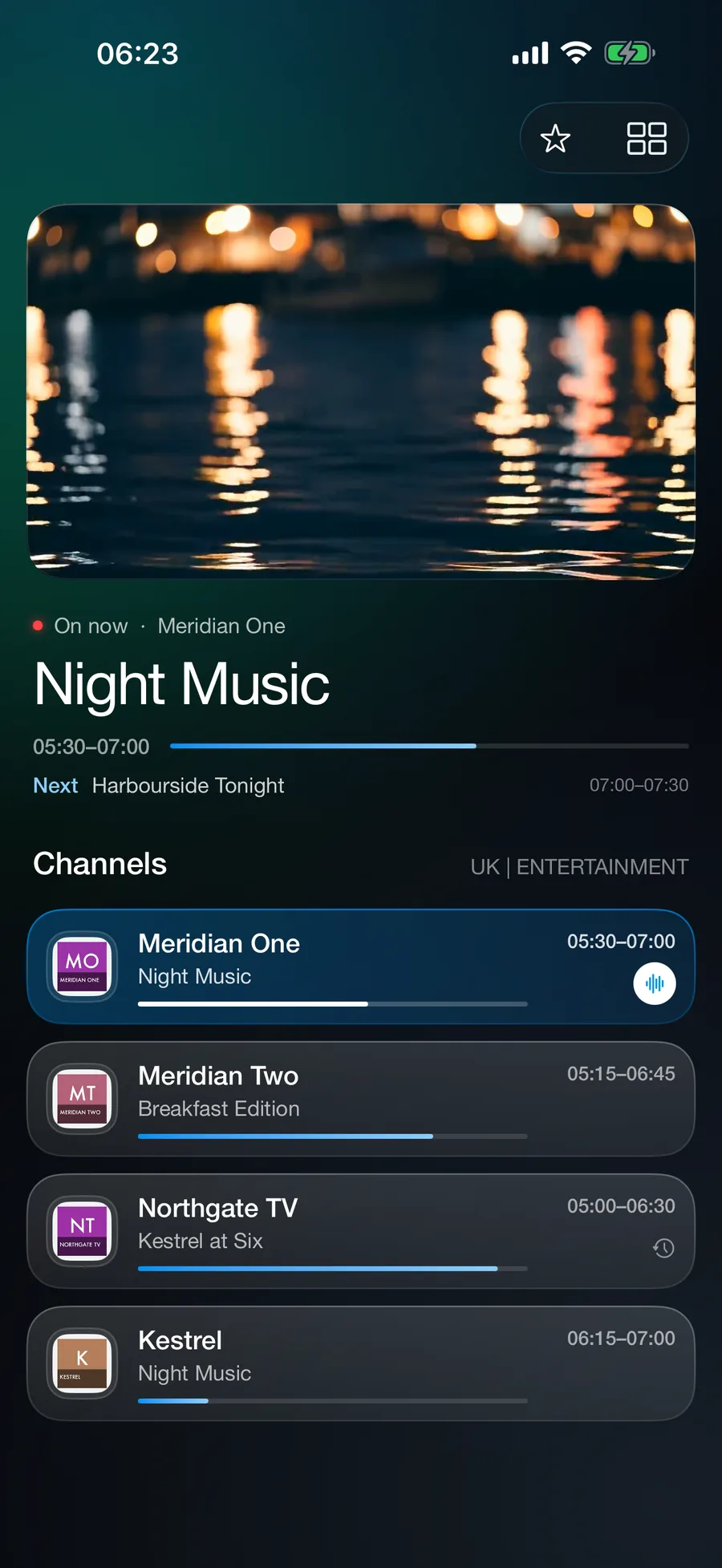
Live, with what is on now.

Channels stay grouped the way your server groups them, not flattened into one endless list — and where your server provides a guide, each shows what is on now and how far through it is.

Films & box sets

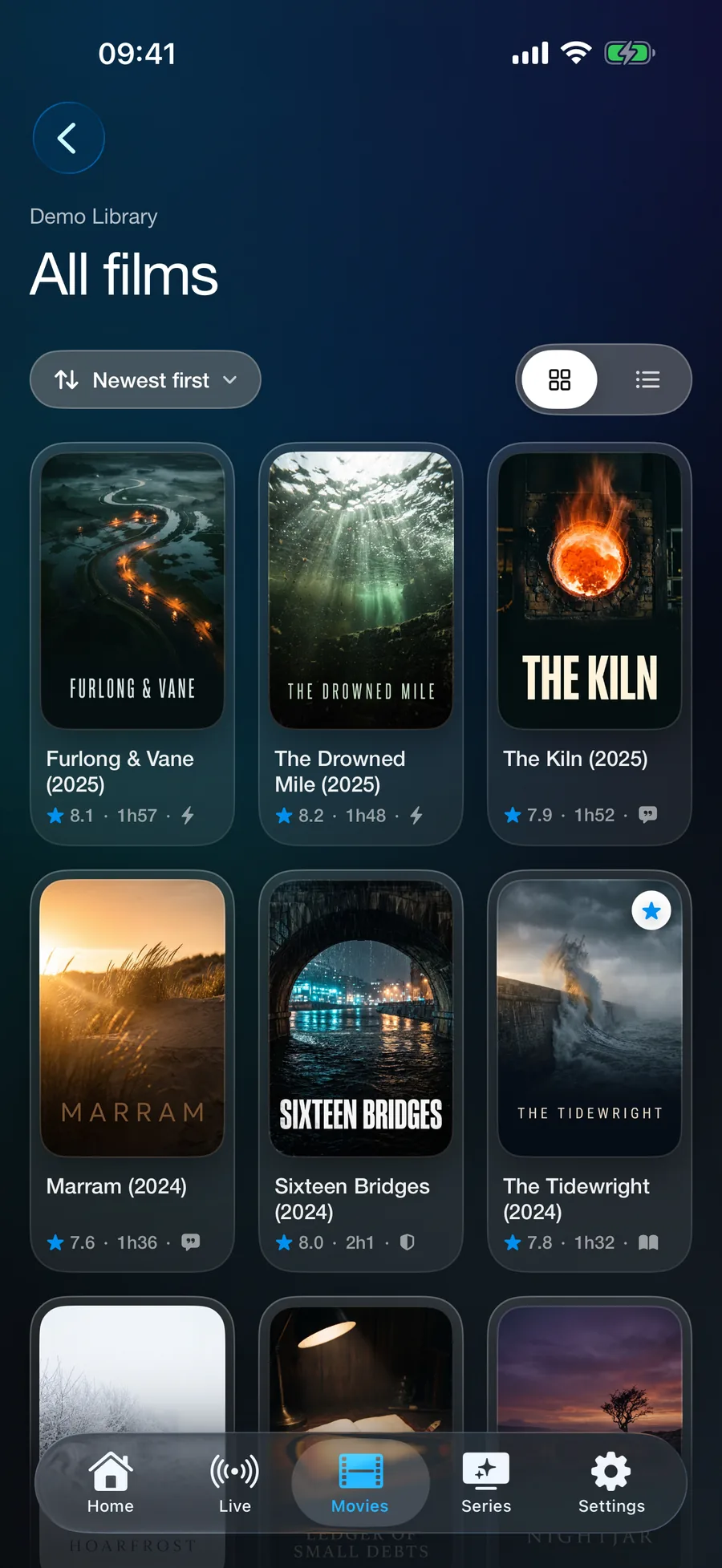
Your library, laid out as one.

Posters and, where your server supplies them, ratings, runtimes and plots — presented properly rather than as a list of file names. Search looks across everything you have connected at once.

Detail

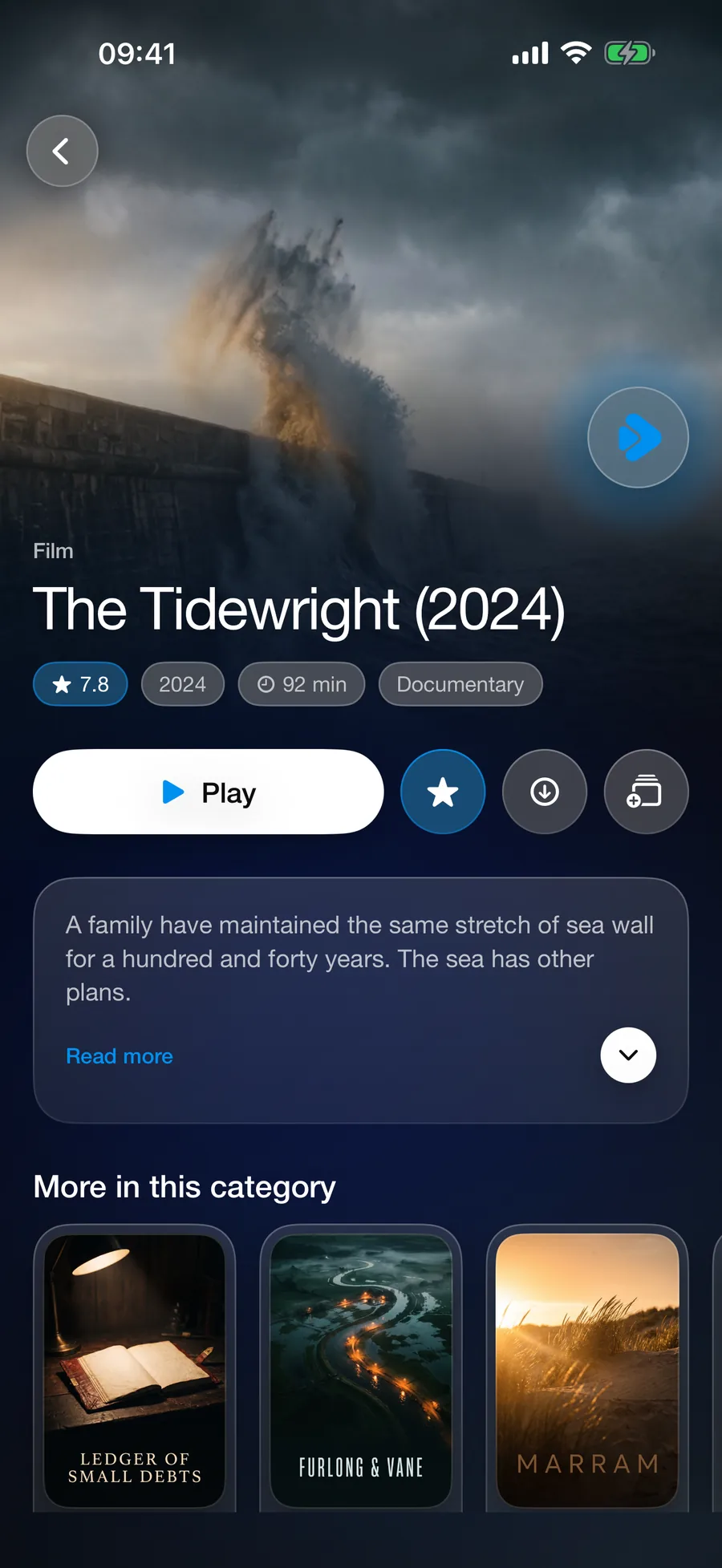
Everything about one title.

Everything your server knows about a film, laid out properly — artwork, synopsis, runtime and more from the same category, one tap from playing.

Every screen shown is Vizi's built-in demo library — invented films and channels, generated artwork.

Phones, tablets and TVs

Now on Apple TV, Android and Fire TV.

Vizi is on iPhone, iPad and Apple TV from the App Store, on Android phones, tablets and TVs from Google Play, and on Amazon Fire TV from the Amazon Appstore. Vizi+ belongs to your Vizi account, so every device you sign in to it has it.

Available now

Apple TV

Built for the Siri Remote, on Apple TV with tvOS 18 or later. From the App Store.

  • Live TV with what is on now and next, films, series, and search you can speak.
  • Send it a playlist from your iPhone, or sign it in with your phone.
  • The same app on the App Store, so Vizi+ bought on your iPhone or iPad comes with it.
  • No adverts on the TV, free version included.
Available now

Android

Phones, tablets and Android TV / Google TV, with Android 8 or later. From Google Play.

  • Live TV, films and series, laid out for a phone and for a television.
  • Sign a TV in, send it your playlists, or search it, from your phone.
  • Vizi+ through Google Play, or bring the Vizi+ you already have with your Vizi account.
Available now

Amazon Fire TV

Fire TV sticks and Fire TV televisions. From the Amazon Appstore: search “Vizi Player” on your Fire TV.

  • Live TV, films and series, built for the television and its remote.
  • Add your playlist from your phone by scanning the code on the TV.
  • Works with the Fire TV Voice Remote.
  • Vizi+ through the Amazon Appstore, or bring the Vizi+ you already have with your Vizi account.
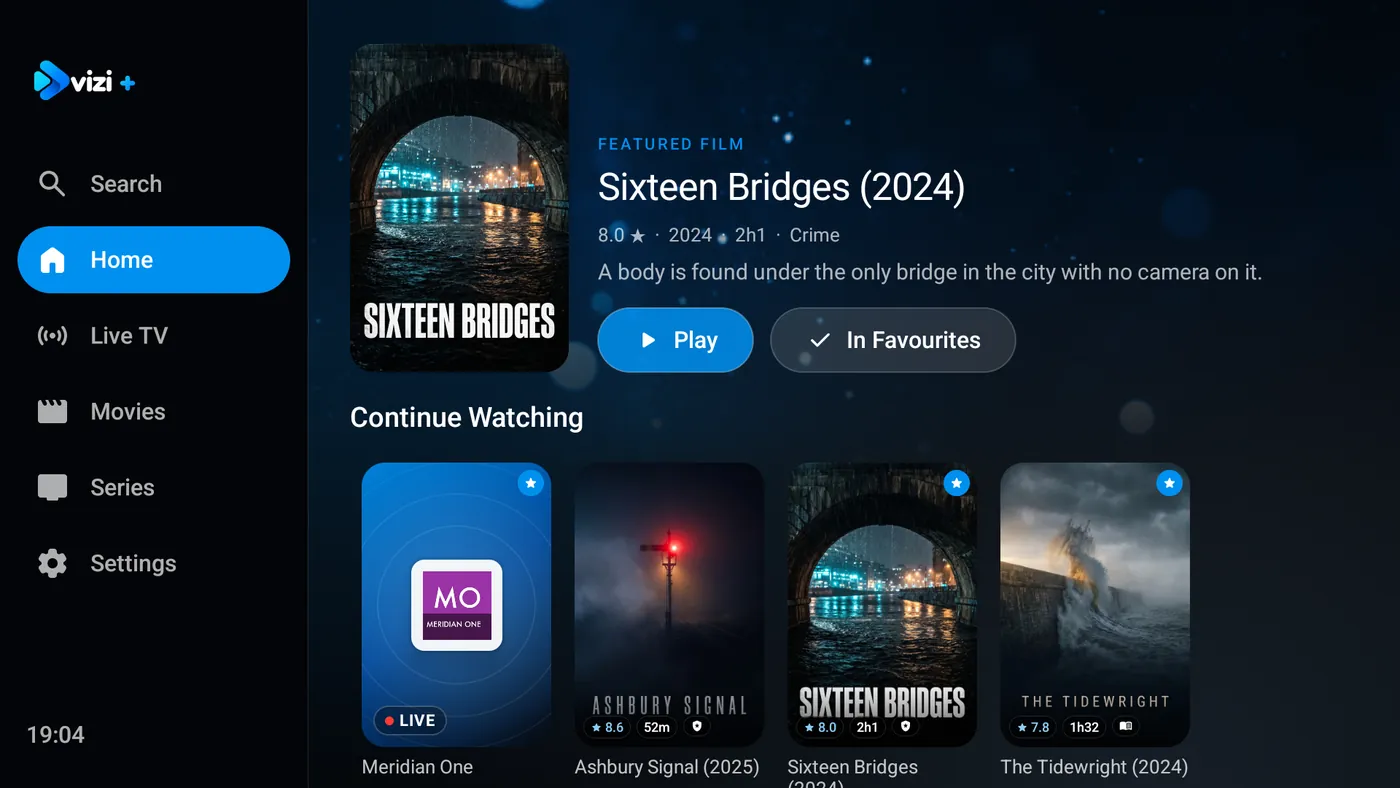
Vizi's home screen on an Android TV: a featured film from the demo library with Play and In Favourites, then a row of Continue Watching
Vizi on Android TV, with the built-in demo library. Every title in it is invented.

Coming soon

Coming soon

LG TVs

LG smart TVs.

Coming soon

Samsung TVs

Samsung smart TVs.

Coming soon

Mac

Vizi on a Mac with Apple silicon.

Not out yet; this page will say when each one is.

Added in version 1.1 for iPhone and iPad

In the app since October. Anything marked Vizi+ needs it; the rest is free.

A new design

Every screen redesigned, with glass panels, bigger pictures and a new opening — the screens on the phone above.

Pages that move

A moving picture behind the top of Home, Live TV, Movies, Series and Settings, in your theme colour.

Send playlists to another device

Scan the other device’s code and your playlists go across, sealed so only that device can open them. One at a time is free; several at once is Vizi+.

Sign in with a code

Sign another device in to your Vizi account from this one — a TV, say, with nothing to type on a remote.

Collections and favourites, like any categoryVizi+

Open a collection or your favourite channels and they play like a category: the picture, what is on, and the guide.

Change channel in full screen

Change channel and see what is on now and next without leaving the picture.

Signed in without a signal

Open Vizi with no connection and you are still signed in, with your Vizi+.

New in version 1.2.0

New in Vizi 1.2.0.

Update from the App Store for more control over how things sound and play, and a roomier layout on iPad.

Volume boostVizi+

Push the sound to 125% or 150% when a quiet video or a noisy room needs it.

Clear voice and Night soundVizi+

Two sound presets, and a nudge to put sound and picture back in step.

Subtitles your wayVizi+

Choose the subtitle size, and a dark box behind the words so they read over any picture.

Double-tap to skipVizi+

And slide down the left side of the picture to change brightness.

AutoplayVizi+

The next episode starts by itself.

Keep playingVizi+

Swipe the player away or move to another part of Vizi, and it carries on from a tab at the edge of the screen. Tap the tab to come straight back.

Show your password

A Show button beside every playlist password box, so you can check what you typed.

A roomier iPad layout

Films and series put a smaller picture beside the title and buttons, with the episodes underneath. Live TV opens a category’s channel list first.

A steadier guide

The programme guide no longer freezes when you open all your channels at once on a large playlist.

Built for the playlist you already have.

Vizi is a player, not a service. It has no channels of its own — only a small invented demo library so you can see how it works — and nothing to browse until you connect something.

People use it with playlists from their own media server, from broadcasters that publish their streams openly, and from services they are licensed to watch with a player of their choice.

Bring your own playlist

An Xtream Codes login or an M3U URL, and as many playlists as you like, free, browsed together. Channels arrive grouped the way your server groups them; with an Xtream Codes login, films and box sets come with posters, ratings and plots.

Formats that defeat other players

Two decoding engines under the bonnet, so formats that defeat other players still open.

Yours, offlineVizi+

Download films and episodes to watch with no signal at all, and record live TV while Vizi is open — with Keep Screen Dark, even with the phone in your pocket.

For the householdVizi+

Kids profiles that reach only what you allow, with a PIN you control, and parental controls on everything else. Profiles need a free Vizi account.

Picture in Picture and AirPlayVizi+

Keep watching in a corner while you use another app, live TV included. AirPlay sends films and episodes in standard formats to a television; live TV and catch-up decode differently and cannot be sent that way.

We know almost nothing about you

Your server username and password stay in your device's Keychain and go only to that server — never to us. Nothing about what you watch reaches us, and an account is optional, needed only for kids profiles. The free tier's adverts are served by Google, which collects its own data to show them and personalises them only if you allow tracking; Vizi+ removes them.

Vizi+

Everything unlocked. No adverts.

  • No adverts, anywhere
  • The full TV guide where your server provides one, with catch-up where it records it
  • Downloads and live TV recording
  • Multiview: up to four things at once, side by side
  • Favourites, continue watching and collections
  • Programme reminders
  • Kids profiles and parental controls
  • Picture in Picture, live TV included, and AirPlay for films and episodes
  • Theme colours and a matching icon

The free version is supported by advertising. Vizi+ removes the adverts and opens the rest. Or watch one advert for an hour of most of it — everything except downloads, recording and theme colours.

£1.99a month£14.99a year
or£29.99once, for Vizi+ Lifetime

UK prices; Apple sets the equivalent in other countries. Renews automatically unless cancelled at least 24 hours before the period ends, in Settings › your name › Subscriptions. Lifetime is one payment for Vizi+ as it is today, for as long as Vizi runs; features may change, and new ones may cost extra.

Download on the App Store

What Vizi is not

Vizi supplies no real content — only a small invented demo library so you can see how it works — and comes with nothing pre-loaded. There is no directory and no search for places to find media. You provide the address; it plays what is at it.

It must not be used to reach anything you do not have the right to watch. That is not a disclaimer buried in a footer — it is the condition of using it, we enforce it, and accounts that break it are closed. Acceptable use →